Simulation models
PureEdgeSim is built from a small set of replaceable models. Each model answers one question: when are tasks generated, where can they run, how long does execution and communication take, how much energy is consumed, where are devices located, and which destination does the orchestrator choose. This guide explains the default answer to each question, including the exact formulas used in the code, so that you can reason about your results and decide which model to replace.
If you only want to change a parameter, read Configuration instead. If you want to implement your own model, read Customizing models after this page.
How models are selected
SimulationAbstract holds one class reference per model. The defaults are the classes described in this guide. Replace any of them before calling launchSimulation():
Simulation simulation = new Simulation();
simulation.setCustomTaskGenerator(MyTaskGenerator.class);
simulation.setCustomComputingNode(MyComputingNode.class);
simulation.setCustomMobilityModel(MyMobilityModel.class);
simulation.setCustomNetworkModel(MyNetworkModel.class);
simulation.setCustomEdgeOrchestrator(MyOrchestrator.class);
simulation.launchSimulation();
Models are instantiated reflectively, so the constructor signature must match exactly:
| Model | Required constructor |
|---|---|
| Task generator | (SimulationManager) |
| Computing node | (SimulationManager, double mipsPerCore, int cores, double storage, double ram) |
| Mobility model | (SimulationManager, Location) |
| Network model | (SimulationManager) |
| Orchestrator | (SimulationManager) |
A model also inherits a lifecycle from SimEntity:
onSimulationStart()is called once, before the event loop begins. The mobility model precomputes its path here.processEvent(Event)receives the events that the model scheduled for itself.- Computing nodes receive a periodic
UPDATE_STATUSevent everyupdate_interval, which is where energy and location are refreshed.
Every model runs inside the same discrete-event engine. It must not use its own threads or wall-clock timers, and it must schedule events rather than sleep.
Task generation model
DefaultTaskGenerator pre-generates the complete task list before the simulation starts. Nothing is generated on the fly during the event loop.
When tasks are created
Without an arrival pattern, the generator works per minute. For each simulation minute st, every generating device creates its burst at a random second within that minute:
time = st * 60 + random(0, 15)
Each application has a rate, interpreted as tasks per minute. For a burst starting at time t, the generator inserts rate tasks spaced by 60 / rate seconds:
task 0: t
task 1: t + 60/rate
task 2: t + 2*60/rate
...
With rate=6, a device produces one task every 10 seconds while the application is active. The number of minutes comes from simulation_time converted to seconds and then divided by 60, so a 10-minute scenario generates 10 tasks per device per rate unit, not 10 tasks in total.
An application may replace that fixed spacing with an arrival pattern, which is the time between two consecutive tasks of one device, in seconds:
<arrival>poisson</arrival>
<arrival distribution="weibull" shape="2" scale="3"/>
poisson (or exponential) draws exponential gaps with a mean of 60 / rate, which is the classical Poisson traffic model. uniform draws gaps between zero and twice that mean, so the average rate is preserved. A distribution element gives you the exact inter-arrival law. With an arrival pattern, tasks are no longer grouped by minute: the device emits one task each time the drawn gap expires, from the start of the simulation until its end, and a gap is never shorter than one second.
Both the burst size and the arrival time can vary per task, and every random value now comes from Randomness, the shared source of randomness. Set random_seed in the properties file and a run becomes fully reproducible: the same scenario, the same task times, the same sizes. Without a seed each run draws its own values, as in previous versions, and comparing algorithms means averaging several runs.
Which device runs which application
Application usage percentages are assigned to devices once, before generation:
- For every application except the last one in
applications.xml,usage_percentageselects(int)(percentage * deviceCount / 100)devices at random. - Remaining devices are assigned to the last application. This is why the last application acts as the residual category: percentages do not have to sum to 100, and any rounding remainder falls into the last application.
Devices with isGeneratingTasks() false are removed before this assignment. Sensors created from datacenter definitions are not task generators.
What a task carries
Every generated task receives:
- request size, results size, and container size in bits (converted from kB in the XML),
- maximum tolerated latency,
- task length in million instructions,
- application identifier and task type,
- the generating edge device,
- the registry, which defaults to the first node in the cloud list.
Each of those numeric parameters is drawn from the application’s distribution, so two tasks of the same application are not identical unless the value was written as a plain number. The scalar getters of Application still return the mean of the distribution, which is what the reports and the charts print.
The task identifiers are global and increasing within one simulation. They are useful for tracing a task through the debug log.
Service graphs
An application can model a multi-stage service instead of a single job. Its subtasks are declared in applications.xml (see Configuration), and the generator turns one request into one task per subtask:
request at t
  ├── capture   scheduled at t
  └── detect    waits for capture
        └── alert waits for detect
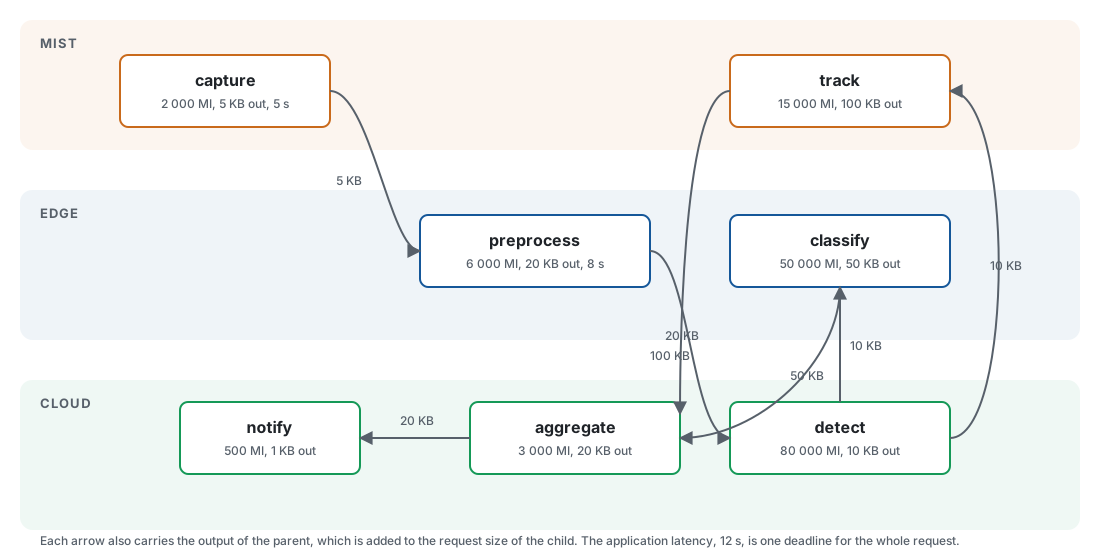
A pipeline can also branch and join, and its stages do not share a tier. The figure shows the seven-stage graph of Example24, where the light stages stay on mist devices while the heavy ones move to edge data centers or the cloud:
Task-graph shapes
PureEdgeSim does not restrict applications to a fixed list of graphs. Any acyclic
graph that depends_on can express is valid, and one scenario file can mix the
shapes below. The four names describe what a workload looks like, not separate
framework classes: every one of them is parsed into the same Subtask list.
Monolithic. The application has no <subtask> element. One request becomes
one independent task, which is the behaviour of every release before 6.0.
flowchart LR
    R[request] --> T[task] --> D[results to device]
Sequential (pipeline). Each stage needs the results of the previous one, so the stages execute in order and the chain is the critical path of the graph.
flowchart LR
    C[capture] --> D[detect] --> T[track] --> A[alert]
Parallel (fork-join). A root fans out to independent stages, and a join waits for all of them. The join is released by its slowest parent, so the siblings can overlap only if they run on different nodes.
flowchart LR
    S[collect] --> P1[preprocess A]
    S --> P2[preprocess B]
    P1 --> F[fuse]
    P2 --> F
    F --> U[upload]
Complex DAG. Fan-out, fan-in, several roots, and diamonds in the same graph. Any acyclic arrangement is accepted, including disconnected components.
flowchart LR
    R1[sensor feed] --> D[detect]
    R2[metadata] --> D
    D --> T[track]
    D --> A[alert]
    T --> M[merge]
    A --> M
    M --> U[upload]
What the model still does not represent: dependency edges are unconditional, so conditional branches and loops cannot be expressed, and a graph cannot wait for “any” parent instead of “all” of them. Everything else that matters for realistic results is modeled:
- The data of an edge is charged. When a parent returns its results to the device, its output size is added to the request size of every child before the child is offloaded. A child therefore uploads what its parent produced plus its own request, so a long chain pays the network cost of every hop, not only of the first one.
- The deadline is end to end. The application
latencyis drawn once per request, and every subtask carries the same absolute deadline. A subtask whose result reaches the device at or after that deadline fails withFAILED_DUE_TO_LATENCY, and so does the request, even when every individual subtask met its own bound. Per-subtask bounds are still checked from the release time of the subtask, as before. - Some subtasks are optional. A subtask declared
optional="true"is skipped with statusSKIPPEDwhen one of its dependencies fails, instead of failing the request. Its dependents are released with the inputs they actually received, so a degraded result can still be produced. An optional root is rejected, because a root has no dependency that could fail.
The model has three properties worth knowing before you interpret results:
- Requests, not tasks, follow the rate. A device assigned the application issues
raterequests per minute; each request expands into the whole graph. The task rate observed by the network and the computing nodes is thereforerate * subtasks, weighted by the task lengths. - A subtask is released on results. When a parent returns its results to the device, the manager decrements the remaining-dependency counter of every child. The child enters the event queue only when that counter reaches zero, which is how a join waits for all its parents. Subtask times are set at release time, not at request time, so the waiting time of a child starts when it is submitted.
- Failures cascade. A required parent that fails for any reason, including a dead device, insufficient resources, a missed subtask bound, or a missed request deadline, fails every required descendant with
FAILED_BECAUSE_DEPENDENCY_FAILED. Optional descendants are skipped instead. Subtasks that are never sent do not enter the task failure rate; they are reported in their own CSV columns and in the text report. The simulation still counts them as generated tasks, so termination and progress reach 100 percent.
Because every task of a request shares a request identifier, the logger also reports the number of requests generated, the percentage that completed successfully, and the average end-to-end makespan of the successful ones. A request succeeds when none of its required subtasks failed, and its makespan is the time between the request arrival and the return of the last result. This is the metric to quote when the claim is about a service, not about individual tasks.
Each subtask samples its own attributes from the application distributions unless the XML overrides them, and each has its own container size, so the storage and RAM checks at the destination apply per subtask.
The placement cache is an application-level shortcut, not a graph-level one: without intervention, the first subtask decides where the whole application runs. A partitioning policy therefore clears the placement after each decision and selects a node per subtask, from the subtask name and the application identifier. Example9PartitioningOrchestrator derives the partitions from the graph structure, and Example10GeneticOrchestrator searches them with a genetic algorithm; both run the same video analytics graph, so their plans can be compared.
A partition plan can be static or dynamic. A static plan is computed once, before the simulation starts, from the declared subtasks and their distributions; Examples 9 and 10 build theirs in the orchestrator constructor. A dynamic plan is recomputed from the current node loads, placement, and reachability, so it reacts to device death, mobility, and load drift at the cost of a decision per task. Example24DynamicRepartitionOrchestrator refreshes the tier of every subtask every 30 seconds and replans immediately when a planned tier loses all of its nodes; its README compares the result with the same scenario under a frozen plan. The clearing rule of the previous paragraph applies to both. See Writing orchestrators.
The dependency bookkeeping lives in TaskAbstract: addDependency, addDependent, dependencyFinished, getDependencies, and getDependents. A task class that implements Task directly keeps working for monolithic applications, because the interface provides neutral default methods.
Recorded traces
Every mechanism above draws its arrivals from a distribution, which reproduces the
mean and the spread of a workload but not its shape. generate() is called once,
before the first event, and returns whatever queue you can build, so nothing forces
it to sample: it can read a file and emit one task per recorded line.
Example 25 does exactly that with a
published production trace, the 8819 LLM inference requests of the Azure dataset
released with the Splitwise paper, each recorded with its arrival instant and its
prompt and completion token counts.
The reason to do it is measurable rather than cosmetic. That hour has a mean rate of 2.57 requests per second and an inter-arrival coefficient of variation of 13.15, against 1 for a Poisson process; its busiest ten-second window carries 412 requests, 16 times the hourly mean, and 12 of its 58 minutes carry nothing at all. Replayed on one 8-core edge server sized to the trace’s mean demand, it produced 120201 seconds of queueing and 36.06 percent of the requests inside their deadline. The same scenario fed by a Poisson generator tuned to the same mean rate and the same mean task sizes did the same amount of work, 42.42 against 41.56 percent CPU utilization, and produced 173 seconds of queueing with every request meeting its deadline. A study of that server’s capacity run on synthetic traffic would have concluded that it has headroom.
A trace names what a request is, not how long it takes on the machine you simulate,
so the conversion into simulator units stays your responsibility: prompt and
completion tokens become task length, token counts become request and results sizes,
and a service-level objective becomes setMaxLatency. Two properties of the
framework limit how faithfully a file can be replayed. The clock ticks in whole
seconds, so arrival offsets are rounded: bursts survive, their internal order does
not, and 99.6 percent of the requests of that hour share their second with another
one. And generate() runs before the event loop, so a trace is a fixed schedule
known at the start, not a stream that can react to what the simulation does.
What to override
| Goal | Method |
|---|---|
| Change when tasks appear | generateTasksForDevice(ComputingNode, int) |
| Change the arrival pattern only | generateRandomlyArrivingTasks(ComputingNode, int, Application) |
| Change application-to-device assignment | generate() |
| Change the fields of one task | insert(int, ComputingNode, Application, int) and createTask(int) |
| Change a whole burst | insert(int, int, ComputingNode) |
| Use a completely different traffic model | Extend TaskGenerator and override generate() |
| Replay a recorded workload | Override generate(), read the file, build each task and call scheduleTask, as in Example25TraceTaskGenerator |
DefaultTaskGenerator is intentionally simple. Real workloads often need bursts, diurnal patterns, or correlated tasks; those belong in a custom generator.
Computing node model
DefaultComputingNode models a resource pool with CPU, RAM, and storage.
Resources and sensors
A node is constructed with mipsPerCore, cores, storage, and ram, in that order; the last two are easy to swap by mistake. Total MIPS capacity is mipsPerCore * cores, and the same number is used both for execution timing and for utilization accounting.
If mipsPerCore <= 0, cores <= 0, or storage <= 0, the node is marked as a sensor. Sensors are excluded from the Mist candidate lists and cannot be selected as offloading destinations. The generator uses this rule to turn entries with zero resources into pure data sources.
Receiving a task
submitTask(Task) does three things:
- Records the arrival time.
- Reserves storage equal to the container size.
- Starts execution immediately if at least one core and enough RAM are free. Otherwise the task joins a FIFO queue.
RAM is only reserved when execution starts, not when the task is queued. A queued task can therefore start later even if RAM has become tighter in the meantime; the queue is a scheduling device, not a hard admission-control mechanism. Storage is reserved earlier, at arrival.
Execution time
Execution uses exactly one core:
executionTime = task.length / mipsPerCore
The number of cores controls how many tasks can execute concurrently, not how fast a single task runs. A node with 8 cores and 1000 MIPS per core executes four tasks in parallel, each at 1000 MIPS, and the fifth waits.
Completion
When a task finishes, the node:
- frees one core, the task’s RAM, and the task’s storage,
- records the execution finish time,
- immediately schedules
TRANSFER_RESULTS_TO_ORCHto the simulation manager, - starts the first waiting task, if any.
There is no preemption and no priority. A long task occupies its core until it finishes, and waiting tasks are served strictly in arrival order.
Utilization accounting
Two different CPU metrics are maintained:
- Current utilization: the sum of the lengths of currently executing tasks, divided by total MIPS capacity, capped at 100 percent.
- Average utilization: total executed instructions divided by
totalMipsCapacity * currentClock, capped at 100 percent.
The average metric is what the CSV reports. It is a ratio of work done over capacity offered, so it can look low even when the node is busy in bursts.
Death
EnergyAwareNode.updateStatus() runs every update_interval. It adds static energy and, when the node is battery powered, marks it dead as soon as the battery reaches zero. Dead nodes:
- are rejected by
Orchestrator.offloadingIsPossible, - cause tasks already in flight to fail in the phase checks described in Task lifecycle,
- stop generating tasks, because generation checks the device state.
Death is only checked on the update tick. A device can consume more than its remaining battery during one interval and die at the end of it.
What to override
Extend DefaultComputingNode to change scheduling (for example, shortest-job-first), to add GPU or accelerator resources, to model a different execution-time formula, or to add admission control. Example 26 does the last two together: its node puts hard real-time tasks at the head of the queue that the default model keeps in FIFO order, and refuses a task whose container the node can no longer host, for storage, for RAM, or because its battery is almost flat. Extend ComputingNode directly only if you also provide the many accessors used by the orchestrator and the logger; DefaultComputingNode already implements them.
Energy model
EnergyModelComputingNode implements a linear power model. Power is expressed in watts, energy in watt-hours, and simulation time in seconds.
Static consumption
While a node is alive, every update tick adds:
idleConsumption / 3600 * update_interval
This is the energy the node consumes merely by existing. It is charged even when no task is running. The 3600 converts watts and seconds into watt-hours.
Dynamic consumption
When a task starts, the node charges the extra power used during execution in one lump sum:
(maxActiveConsumption - idleConsumption) / 3600 * task.length / totalMipsCapacity
The denominator is total capacity rather than per-core capacity. This is intentional in the current implementation: the dynamic energy is spread over the whole node while the task occupies one core. It is a modeling choice worth knowing when you compare nodes with different core counts.
Idle energy for the same execution period continues to be added by the periodic tick, so the total while running is approximately maxActiveConsumption scaled by the fraction of the node’s capacity that the task uses.
Total and battery
totalEnergy = cpuEnergyConsumption + networkEnergyConsumption
A battery-powered node starts with initialBatteryLevel percent of batteryCapacity watt-hours. Remaining energy is capacity minus total consumption, clamped at zero. getBatteryLevelWattHour() returns -1 for a node that is not battery powered, and getBatteryLevelPercentage() divides that by the capacity, which is typically zero for such nodes. Callers must check isBatteryPowered() before asking for a battery level, as the logger does.
The edge-device XML controls battery, batteryCapacity, initialBatteryLevel, and connectivity. Data centers are not battery powered by default.
Network energy
Two separate mechanisms exist:
EnergyModelNetworkLinkchargesenergyPerBit * transmittedBitsfor wired links. WAN and MAN links receive this model; the per-bit values come from the properties file.EnergyModelComputingNode.updatewirelessEnergyConsumption(bits, flag)charges edge devices for sending and receiving over wireless links, using the per-bit values for the device’s configured connectivity (wifi,cellular, orethernet).
DefaultNetworkModel passes the flag according to the role of each node, so a device that sends a transfer is charged the transmission rate of its connectivity and a device that receives one is charged the reception rate. The reception and transmission rates of wifi, cellular, and ethernet are configured separately in the properties file.
What to override
Subclass EnergyModelComputingNode for nonlinear CPU power curves, sleep states, or cooling models. Since the default node creates its energy model internally, you may need to extend DefaultComputingNode as well and assign your model, or set a custom model from a custom computing node constructor.
Network model
DefaultNetworkModel moves requests, containers, and results through a topology of links. The topology is a directed weighted multigraph built by DefaultTopologyCreator.
Topology construction
The default topology contains:
- a WAN path between the cloud and the rest of the system,
- one edge data center named
dc1connected to the cloud by WAN, - MAN links between edge data centers, read from
edge_datacenters.xml, - LAN links between each edge device and its closest peripheral edge data center within
edge_data_centers_range, - a device-to-device link used for direct Mist communication.
Each link is directional. The creator normally adds an up link and a down link for every pair, using the device’s configured connectivity (wifi, cellular, or ethernet). The link subclasses copy bandwidth, latency, and per-bit energy from the properties file, so changing wifi_bandwidth affects every WiFi link at construction time.
When use_one_shared_wan_link=true, the creator inserts a router between edge data centers and the cloud and marks the two WAN links as IGNORE to avoid double-counting energy. This is what makes a single shared WAN bottleneck visible in the network chart. When the option is false, every edge data center has its own WAN link to the cloud.
Routing
InfrastructureGraph is backed by JGraphT. The shortest path between two nodes is computed once, cached by an identifier derived from the endpoint node identifiers, and reused for later transfers. The cache is per simulation, so a topology that never changes has stable routes.
Edge devices are special because their attachment point can change with mobility. DefaultNetworkModel.send(...) handles four cases:
- Device to device: one direct hop.
- Device to edge data center: the device’s current up link plus the cached path from its current attachment point.
- Edge data center to device: the cached path to the device’s current attachment point plus the device’s down link.
- Everything else: the cached shortest path.
A route is a list of vertices and a list of edges. Each hop consumes the link’s bandwidth and adds the link’s latency once, when the data has finished serializing on that hop.
Bandwidth sharing and progress
A link can carry several transfers at once. On every network_update_interval, each link:
- Divides its bandwidth equally among the transfers currently on it:
bandwidth / activeTransfers. - Advances each transfer by
network_update_interval * allocatedBandwidthbits, if the realistic network model is enabled. - Adds the elapsed transfer time to the task’s network time and to the appropriate LAN, MAN, or WAN usage counter.
- Finishes transfers whose remaining size reaches zero.
With realistic_network_model=false, the remaining size is set to zero on the first update, so the transfer finishes in a single step. Its network time is still computed as fileSize / allocatedBandwidth and added to the task delay, but the transfer does not occupy the link over later intervals. Bandwidth therefore still affects each transfer’s delay through the share it receives when it starts, while queueing and temporal congestion between transfers that start at different times are not modeled. This makes runs much faster, but it is not a latency-only model.
Latency is added per hop when that hop finishes. There is no propagation delay while bits are being serialized, and no processing delay at intermediate nodes. The model is store-and-forward at the granularity of network_update_interval.
What travels over the network
| Transfer type | From | To | Size |
|---|---|---|---|
| Request | Device | Orchestrator | Request size |
| Task | Orchestrator | Destination | Request size |
| Container | Registry (cloud) | Destination | Container size |
| Results to orchestrator | Destination | Orchestrator | Results size |
| Results to device | Orchestrator | Device | Results size |
If the orchestrator is the device itself, or the destination is the device itself, the corresponding network step is skipped and the next stage is scheduled immediately. Likewise, the container download is skipped when the registry is disabled, when the registry mode is not CLOUD, or when the destination is already the cloud.
The simulated result is that a task’s total delay is the sum of every hop latency, every bandwidth-limited transfer time, queueing at the destination, and execution time. See Task lifecycle for the exact sequence and failure checks.
Network energy and accounting
After each completed transfer, DefaultNetworkModel charges the origin device if it is an edge device and the destination device if it is an edge device. Wired links charge through their EnergyModelNetworkLink. The link also accumulates totalTransferredData, which the logger reads to report network usage.
What to override
Extend DefaultNetworkModel to add link failures, dynamic routing, TCP-like congestion control, or a different energy accounting scheme. Extend NetworkLink to change how bandwidth is shared, for example to give priority to results over requests. Keep the event contract: the simulation manager expects the next stage to be scheduled, not called directly.
Mobility model
MobilityModel is the base class of every mobility model. DefaultMobilityModel implements the classic random-waypoint model with pause and move phases.
Path precomputation
generatePath() runs once at simulation start:
- It records the closest edge data center for the current position.
- If the device is not mobile, it stops.
- Otherwise it steps through the whole simulation at
update_intervalgranularity, storing a location and a closest data center for every tick.
The path is a map keyed by milliseconds. updateLocation(time) reads the entry for the current time, and getClosestEdgeDataCenter() reads the matching data center. Precomputing makes mobility cheap at runtime, but it also means a custom mobility model cannot change course in response to events unless it overrides this mechanism.
A model only implements getNextLocation(Location). The base class gives it everything else it needs: the map size, the step distance (speed * update_interval), the number of ticks, randomInRange, moveTowards, reached, and reflectLocation for bouncing off the borders. Options are read with getParameter, getParameterInt, and getParameterBoolean from the attributes of the <mobility> element.
Movement of the default model
At each step, the default model:
- keeps the current position while a pause is active,
- reflects the direction when the device reaches the map boundary,
- starts a new pause after
mobilityDurationexpires, - resumes after
pauseDurationexpires and picks a new random orientation.
The distance travelled in one tick is speed * update_interval, split into X and Y components with the orientation angle. Speeds and durations come from the edge-device XML entries, not from the global properties file.
The model does not avoid obstacles, does not follow roads, and does not coordinate devices. It is a baseline random-waypoint model, suitable for relative comparisons rather than for reproducing a specific city.
Choosing a model per device type
Since PureEdgeSim 5.7 the <mobility> element selects the model by name, and every other attribute of that element becomes the options of the model. Different device types can then move in different ways inside one scenario:
<device arch="x86" os="linux" vmm="xen">
    <mobility model="gauss-markov" alpha="0.8" std="15">true</mobility>
    <speed>1.4</speed>
    ...
</device>
<device arch="x86" os="linux" vmm="xen">
    <mobility model="waypoint" waypoints="100,100;400,100;400,400">true</mobility>
    <speed>10</speed>
    ...
</device>
Without the model attribute the class configured with setCustomMobilityModel is used, which is DefaultMobilityModel unless you replaced it, so existing scenarios behave exactly as before. An unknown name fails with the list of the known names, and a fully qualified class name is accepted too, as long as the class has the (SimulationManager, Location) constructor.
| Name | Class | What it does | Options (default) |
|---|---|---|---|
random-waypoint, default |
DefaultMobilityModel |
Straight runs separated by pauses, random direction. The historical behavior. | none, uses the pause and mobility durations of the device |
random-walk |
RandomWalkMobilityModel |
New direction every tick, never stops, reflects off the borders. | none |
gauss-markov |
GaussMarkovMobilityModel |
Direction and speed mean-revert to their previous value, giving smooth curved trajectories. | alpha (0.7), std in degrees (30), speed_std in m/s (20% of the speed) |
manhattan |
ManhattanMobilityModel |
Axis-aligned movement along a street grid, turning at intersections. | grid_size in meters (100) |
waypoint |
WaypointMobilityModel |
Follows a fixed route at the device speed, optionally looping. | waypoints as x,y;x,y;... (required), loop (true); the dwell time is the device minPauseDuration |
circular |
CircularMobilityModel |
Orbits a circle, starting from the angle of the initial location. | radius in meters (required), center_x, center_y (the map center), clockwise (true) |
levy-walk |
LevyWalkMobilityModel |
Straight flights with Pareto-distributed lengths: mostly short hops, occasional long jumps. | shape (1.5), min_step (one tick of travel), max_step (the map diagonal) |
brownian |
BrownianMobilityModel |
Independent Gaussian increments per coordinate, for a slowly drifting device. | std in meters per tick (one tick of travel) |
group, rpgm |
ReferencePointGroupMobilityModel |
Devices sharing a group name follow one moving reference point while keeping their initial relative position. | group (“1”), anchor_speed (the device speed), anchor_pause in seconds (0) |
The group model derives the path of its reference point from the group name alone, so all members of a group agree on it without sharing mutable state, and the whole group is reproducible from random_seed.
DefaultMobilityModel is also the one that uses the pause and mobility durations of the device; the deterministic models (waypoint, circular, manhattan) ignore them except where their options say otherwise, and random-walk and brownian never pause.
Reconnection
LocationAwareNode.updateStatus() calls updateLocation() and connectWith(getClosestEdgeDataCenter()) every tick. Connecting rewrites the device’s current up and down links to the new edge data center. If the device’s device-to-device destination is farther than edge_data_centers_range, the application placement is invalidated, so the next task is re-orchestrated instead of being sent to a destination that is no longer reachable.
Initial placement
Devices are placed uniformly at random on the map. A device type may cluster its instances around an area instead, by adding a location element whose coordinates are distributions:
<device arch="x86" os="linux" vmm="xen">
    <location>
        <x_pos distribution="normal" mean="150" std="30" min="0" max="300"/>
        <y_pos distribution="normal" mean="150" std="30" min="0" max="300"/>
    </location>
    ...
</device>
Each instance draws its own position, and the value is clamped to the map. This is how you model a stadium, a intersection, or a factory aisle rather than a featureless field of devices.
What to override
| Goal | How |
|---|---|
| Use a built-in model | Add a model attribute to the <mobility> element |
| Write a new model | Extend MobilityModel, implement getNextLocation(Location), add its name to MobilityModelFactory or select it by fully qualified class name |
| Keep a model private to your project | Call setCustomMobilityModel(MyModel.class); it stays the default when the XML names no model |
| React to events during the run | Override generatePath() as well, since locations are precomputed |
You must keep the (SimulationManager, Location) constructor, and the base class takes care of the speed and duration setters. If your model needs external data, load it in the constructor or in generatePath().
Probability distributions
The com.mechalikh.pureedgesim.distribution package lets any numeric parameter of a scenario vary from one object to the next instead of being fixed. A distribution is written as attributes on the element that normally holds a number:
<request_size distribution="lognormal" mean="25" std="10"/>
<mips distribution="normal" mean="25000" std="3000" min="5000"/>
A plain number still works and behaves exactly as before: it is read as a constant distribution. Two attributes are shared by every distribution: min and max bound the generated values. For uniform and triangular they define the support; for anything else the value is drawn again until it falls inside the range, and clamped after one hundred attempts.
Where distributions may be used:
| File | Elements | What varies |
|---|---|---|
applications.xml |
rate, latency, container_size, request_size, results_size, task_length, arrival |
Each task |
edge_devices.xml |
mips, cores, ram, storage, speed, batteryCapacity, initialBatteryLevel, idleConsumption, maxConsumption, the four pause and mobility durations, x_pos and y_pos of a location element |
Each device instance |
cloud.xml, edge_datacenters.xml |
mips, cores, ram, storage, consumption values |
Each data center entry |
The size parameters of applications.xml stay in kilobytes: the distribution is sampled and then converted to bits, exactly like a plain value. The mean of the distribution is what the scenario reports and the charts use, so a run with a lognormal request size remains comparable with the run that used a constant one.
Available distributions:
| Name | Attributes | Support | Typical use |
|---|---|---|---|
constant |
value |
the value | a fixed parameter, written as a bare number |
uniform |
min, max |
[min, max] |
sizes and delays with no preferred value |
triangular |
min, mode, max |
[min, max] |
a most likely value between two extremes |
normal |
mean, std |
all reals | measurement noise, hardware capacity |
lognormal |
mean, std |
positive reals | request and file sizes, which are skewed to the right |
exponential |
mean |
positive reals | inter-arrival times, service times |
erlang |
shape, scale |
positive reals | a sum of exponential phases |
gamma |
shape, scale |
positive reals | waiting times with a long tail |
weibull |
shape, scale |
positive reals | failure times, bursty traffic |
pareto |
scale, shape |
values at or above scale |
heavy-tailed flows, the flight lengths of a Levy walk |
beta |
alpha, beta |
[0, 1] |
a fraction, such as a battery level |
bernoulli |
probability |
0 or 1 | a device that fails, a task that is a duplicate |
binomial |
trials, probability |
0 to trials |
the number of successes in a batch |
geometric |
probability |
1 and above | attempts before the first success |
poisson |
mean |
integers, 0 and above | the number of tasks generated each minute |
categorical |
values, optional weights |
the listed values | a choice between a few profiles |
Each distribution exposes sample(), sampleInt(), mean(), getMin(), getMax() and isDiscrete(), so a custom model can draw from the same objects the scenario parser built. BoundedDistribution and ScaledDistribution wrap any of them to clip or rescale a value, and DistributionFactory.create("normal", options, random) builds one from a name.
Values come from Randomness, which holds the shared generator. Without a seed it is a strong secure generator and every run differs. With random_seed set in the properties file, each thread gets its own stream derived from the seed, so runs are reproducible and parallel sweeps stay fast. Call Randomness.beginScenario(salt) when you want several repetitions that are each reproducible but different from one another.
Orchestration model
DefaultOrchestrator implements two algorithms. Both receive the same candidate list and the same architecture layers.
Candidate eligibility
A node is eligible only if its type appears in the architecture layers and the location rules pass:
- Cloud nodes are always eligible when the architecture includes Cloud.
- Edge data centers are eligible only if they are the current attachment of the task’s device or of the task’s orchestrator. This encodes the one-hop rule: a device cannot offload to an edge data center it is not attached to.
- Mist devices are eligible when they are within
edge_devices_rangeof the device or of its orchestrator, are alive, and are not sensors.
The orchestrator’s candidate list is built once from the architecture name. For example, ALL contains cloud, edge, and mist nodes, while EDGE_AND_CLOUD contains only cloud and edge data centers. Sensors are excluded from every list.
TRADE_OFF
For each eligible node, the score is:
score = (assignedTasks + 1) * weight * task.length / node.mipsPerCore
The node with the smallest score wins. Weights are:
| Node type | Weight | Interpretation |
|---|---|---|
| Edge data center | 1.2 | Baseline. Close, but shared by many devices. |
| Mist (edge device) | 1.3 | Very close, but devices are resource constrained. |
| Cloud | 1.8 | Plenty of capacity, but high latency and energy cost. |
The score combines three ideas: more assigned tasks make a node less attractive, a larger weight makes a layer less attractive, and more MIPS per core makes a node more attractive. The assignedTasks counter only increases. It is a load proxy, not a queue length, and it is never decremented when a task finishes.
TRADE_OFF does not look at link latency, bandwidth, current queue length, battery level, or network energy. It is a fast heuristic, not a network-aware scheduler. If your research question depends on any of those, write a custom orchestrator.
ROUND_ROBIN
ROUND_ROBIN selects the eligible node with the smallest assignedTasks count, breaking ties by list order, and increments that count. It ignores task length and node capacity. It is useful as a simple baseline and as a sanity check that the network and logging paths work.
Application placement
The orchestrator is not called for every task. The first task of a device triggers a decision, and the chosen destination is stored on the device as the application placement. Later tasks go directly to that destination. The placement is cleared when:
- a task fails for any reason (
setFailedclears it), - the device moves out of range of its device-to-device destination,
- a custom model explicitly calls
setApplicationPlaced(false).
This caching is why the CSV can show a stable destination per device even when the algorithm is stochastic. It also means a change in conditions is only noticed when a failure occurs or when mobility invalidates the placement.
Orchestrator deployment
enable_orchestrators controls whether requests travel to a separate orchestrator. The deployment mode is read from the properties file:
CLOUD: the first cloud node orchestrates.EDGE: the device’s closest edge data center orchestrates.MIST: the device orchestrates itself, so no request transfer is simulated.- Any other non-empty value: the orchestrator is chosen as the node in the orchestrator list with the smallest topology delay to the device.
When orchestrators are disabled, each device orchestrates its own tasks. This removes the request and result forwarding legs from the delay, which is a common source of confusion when comparing runs with different settings.
What to override
Orchestrator provides the candidate lists, the eligibility helper, architecture parsing, and the placement side effects. A custom orchestrator usually overrides findComputingNode and resultsReturned. It can use any information exposed by ComputingNode, the topology, the task, or external state. See Writing orchestrators for a worked example.
How the models interact
The following sequence is the shortest accurate summary of a default run:
- The task generator creates the full task list.
- The simulation manager sends each task to the orchestrator, over the network if orchestrators are enabled.
- The orchestrator selects a destination, possibly after a network request and a placement check.
- The network model transfers the request to the destination, downloading a container first if the registry is enabled.
- The computing node queues or executes the task.
- The network model returns the results to the orchestrator, then to the device.
- The simulation manager records delays, checks the latency budget, and asks the orchestrator to react to the result.
- The logger aggregates the iteration into one CSV row.
sequenceDiagram
    autonumber
    participant TG as TaskGenerator
    participant SM as SimulationManager
    participant OR as Orchestrator
    participant NW as NetworkModel
    participant CN as ComputingNode
    participant LOG as SimLog
    TG->>SM: full task list, before the event loop
    SM->>OR: send the task
    OR->>OR: choose the destination
    OR->>NW: send the request to that destination
    NW->>CN: deliver the request
    CN->>CN: queue, then execute
    CN->>NW: results
    NW->>OR: return the results
    OR->>SM: deliver the results to the device
    SM->>SM: record the delay, check the latency budget
    SM->>OR: react to the result
    SM->>LOG: aggregate the iteration
Each arrow in that list is a place where a model can be replaced without touching the others, provided the event contract and the constructor signature are respected.
Known modeling caveats
These are properties of the current default models that matter when interpreting results:
- TRADE_OFF ignores network state and never decays its load counter.
- The average CPU utilization is a lifetime ratio, not an instantaneous average, and it is capped at 100 percent.
- With the realistic network model off, a transfer completes in one step and its delay is computed from the bandwidth share available at that instant; this removes temporal congestion but not the bandwidth dependence.
- The realistic network model advances transfers in discrete steps of
network_update_interval; the final step can overshoot the remaining size, and the overshoot is clamped. - Bandwidth is shared equally among active transfers on a link, with no priority and no per-flow fairness beyond that.
- Mobility paths are precomputed, so a mobile device cannot react to network conditions during the run.
- Task generation and every distribution draw from
Randomness: withrandom_seedempty the runs are stochastic and must be replicated before comparing algorithms, and with a seed they are reproducible, which also means that a single seed is a single sample of the process. - Distributions with unbounded support, like the normal one, are clipped to the range you give in
minandmax, so a poorly chosen standard deviation silently produces a truncated distribution. - The static energy tick and the death check happen at
update_intervalgranularity, so very short battery lifetimes can be overestimated.
None of these invalidates comparative experiments, but each should be stated in a paper’s methodology if it could affect the conclusion.
Where to go next
- Replace one of these models: Customizing models.
- Write a decision algorithm: Writing orchestrators.
- Understand the event sequence: Task lifecycle.
- Tune the parameters mentioned here: Configuration.